⌘CtrlK
Appearance
DWS 独立版(Standalone)安装无需像微服务版(MicroApp)那样进行各种环境准备,只要准备好可以连通使用的数据库即可。
具体步骤如下:
Primeton_DWS_Standalone_7.2.0.tar.gz 目录结构说明:
   ├── server
   │   ├── dws                  # ~ dws server 所在目录
   │   └── pubresmng_ext_lib    # ~ 公共资源数据库驱动外置目录
   ├── service
   │   ├── dolphin              # ~ DolphinScheduler 调度引擎
   │   ├── primeton-di          # ~ 数据加工作业执行引擎
   │   └── seatunnel            # ~ 数据同步作业执行引擎
   ├── web                      # ~ 前端资源和nginx配置文件
   │   ├── afcenter             # ~ 前端文件
   │   └── conf                 # ~ dws server 所在目录
   │       └── dws.conf         # ~ nginx配置文件示例
   ├── install-cluster.sh       # ~ 一键集群安装脚本
   ├── start-standalone.sh      # ~ 一键启动脚本
   ├── stop-standalone.sh       # ~ 一键停止脚本
   ├── start-cluster.sh         # ~ 一键集群启动脚本
└── stop-cluster.sh # ~ 一键集群停止脚本创建用户 dws,并且一定要配置 sudo 免密,产品默认用 dws 用户来运行。 # 创建用户需使用 root 登录
useradd dws
# 添加密码
echo "dws" | passwd --stdin dws
# 配置 sudo 免密
sed -i '$adws ALL=(ALL) NOPASSWD: NOPASSWD: ALL' /etc/sudoers
sed -i 's/Defaults requirett/#Defaults requirett/g' /etc/sudoerssudo -u {linux-user}切换不同 linux 用户的方式来实现多租户运行作业,所以部署用户需要有sudo权限。 由于安装的时候需要向不同机器发送资源,所以要求各台机器间能 SSH 免密登陆。配置免密登陆的步骤如下:
su dws

ssh-keygen -t rsa -P '' -f ~/.ssh/id_rsa
cat ~/.ssh/id_rsa.pub >> ~/.ssh/authorized_keys
chmod 600 ~/.ssh/authorized_keys
ssh localhost 判断是否成功,如果不需要输入密码就能 ssh 登陆则证明成功。 #切换 root 用户
su root
mkdir -p /home/dws/Primeton_DWS_Standalone
#将DWS Standalone介质解压到/home/dws目录下
tar -zxvf Primeton_DWS_Standalone_7.2.0.tar.gz -C /home/dws/Primeton_DWS_Standalone
#将目录权限赋予 dws 用户
chown -R dws:dws /home/dws
chmod -R 755 /home/dws设置大小写不敏感,即: lower_case_table_names=1。 本说明以 MySQL 数据库为例:
使用all脚本执行:
server/dws/db-scripts/all/Mysql/all.sql若使用分开的脚本,则需要依次执行以下脚本:
server/dws/db-scripts/single/eos/Mysql/all.sql
server/dws/db-scripts/single/afcenter/Mysql/all.sql
server/dws/db-scripts/single/pubres/Mysql/all.sql
server/dws/db-scripts/single/dws/Mysql/all.sql
server/dws/db-scripts/single/dwsStandalone/Mysql/04-afc-disable-features.sqlservice/dolphin/sql-scripts/init/dolphinscheduler_mysql.sql修改 server/dws/config/DWS/config/user-config.xml 文件
MySQL:
<group name="default">
<configValue key="Database-Type">MySql</configValue>
<configValue key="Jdbc-Type"/>
<configValue key="C3p0-DriverClass">com.mysql.jdbc.Driver</configValue>
<configValue key="C3p0-Url">jdbc:mysql://127.0.0.1:3306/dws?characterEncoding=utf-8&serverTimezone=Asia/Shanghai</configValue>
<configValue key="C3p0-UserName">root</configValue>
<configValue key="C3p0-Password">primeton</configValue>
<configValue key="C3p0-PoolSize">10</configValue>
<configValue key="C3p0-MaxPoolSize">50</configValue>
<configValue key="C3p0-MinPoolSize">10</configValue>
<!-- //seconds, 0 means connections never expire -->
<configValue key="C3p0-MaxIdleTime">600</configValue>
<!-- //idle connections never tested -->
<configValue key="C3p0-IdleConnectionTestPeriod">900</configValue>
<configValue key="C3p0-MaxStatements">0</configValue>
<configValue key="C3p0-NumHelperThreads">1</configValue>
<configValue key="Transaction-Isolation">ISOLATION_DEFAULT</configValue>
<configValue key="Test-Connect-Sql">SELECT count(*) from EOS_UNIQUE_TABLE</configValue>
<configValue key="Retry-Connect-Count">-1</configValue>
</group>编辑 service/dolphin/bin/env/dolphinscheduler_env.sh 文件,修改 dolphinscheduler 数据源信息,并指定JAVA_HOME、PDI_HOME、SEATUNNEL_HOME环境信息,在本示例中配置如下
(略)
# JAVA_HOME, will use it to start DolphinScheduler server
export JAVA_HOME=${JAVA_HOME:-/opt/java/openjdk}

# Database related configuration, set database type, username and password
#DATABASE目前支持 mysql,DM,postgresql,gaussDB,oracle,SqlServer
export DATABASE=${DATABASE:-mysql}
export SPRING_PROFILES_ACTIVE=${DATABASE}
export SPRING_DATASOURCE_URL="jdbc:mysql://127.0.0.1:3306/dolphinscheduler?serverTimezone=Asia/Shanghai&useSSL=false"
export SPRING_DATASOURCE_USERNAME="root"
export SPRING_DATASOURCE_PASSWORD="primeton"
(略)
export SEATUNNEL_HOME=${SEATUNNEL_HOME:-/home/dws/Primeton_DWS_Standalone/service/seatunnel}
export CHUNJUN_HOME=${CHUNJUN_HOME:-/opt/soft/chunjun}
export PDI_HOME=${PDI_HOME:-/home/dws/Primeton_DWS_Standalone/service/primeton-di/diclient}
(略)若使用PostgreSQL数据库,SPRING_DATASOURCE_URL参数中的 url 需要配置参数:stringtype=unspecified。否则运行作业时会报错,参考如下配置:
#数据库使用PostgreSQL时的配置
export SPRING_DATASOURCE_URL="jdbc:postgresql://127.0.0.1:5432/dolphin_dev?stringtype=unspecified"Nginx安装请参考 Nginx安装指南
修改 web/conf/dws.conf 文件,location /的地址指向 web/afcenter目录
cd /home/dws/Primeton_DWS_Standalone
vim web/conf/dws.conf # a part of nginx configuration e.g.
# nginx.conf should include the file
# DWS/AFCenter standalone servers
upstream afcenter {
server 127.0.0.1:28085; # standalone服务ip和端口
}
server {
listen 80;
charset utf-8;
client_max_body_size 200M;
# 超时设置
proxy_connect_timeout 600s;#设置连接超时时间
proxy_send_timeout 600s; #设置发送超时时间
proxy_read_timeout 600s;#设置读取超时时间
proxy_http_version 1.1;
# 请求头转发设置
proxy_set_header Host $host;
proxy_set_header X-Real-IP $remote_addr;
proxy_set_header X-Real-Port $remote_port;
proxy_set_header REMOTE-HOST $remote_addr;
proxy_set_header X-Forwarded-For $proxy_add_x_forwarded_for;
proxy_set_header Upgrade $http_upgrade;
proxy_set_header Connection "Upgrade";
# 安全响应头设置
add_header X-Content-Type-Options nosniff;
add_header X-XSS-Protection "1";
add_header X-Frame-Options "SAMEORIGIN";
add_header Content-Security-Policy "script-src * 'unsafe-inline' 'unsafe-eval'";
add_header Strict-Transport-Security "max-age=SECONDS";
add_header X-Permitted-Cross-Domain-Policies "master-only";
add_header X-Download-Options noopen;
add_header Referrer-Policy "no-referrer" always;
# 静态文件服务
location / {
# change to your web resource folder ${DWS_SERVER_HOME}/web/afcenter, or copy to here: /usr/share/nginx/afcenter
root /home/dws/Primeton_DWS_Standalone/web/afcenter;
index index.html index.htm;
try_files $uri /index.html;
}
# API反向代理
# if afcenter web-ui express mode enabled, route by path prefix /api/
# all API request forward to one server (only one API route)
# else use path rewrite (multi-routes required, remove path suffix e.g. /afc/api* => /api/*; /DWS/api/* => /api/*, ...)
location ~ /api/agent/stream/sse/connect {
gzip off;
gzip_vary off;
# SSE必需的头信息
proxy_set_header Connection '';
proxy_http_version 1.1;
proxy_cache off;
# 保持长连接
proxy_read_timeout 86400s;
proxy_send_timeout 86400s;
rewrite ^/(.*)/api/(.*)$ /api/$2 break;
proxy_pass http://afcenter;
}
location ~ /api/unidata-client/datasource/ai/stream/sse/connect {
gzip off;
gzip_vary off;
# SSE必需的头信息
proxy_set_header Connection '';
proxy_http_version 1.1;
proxy_cache off;
# 保持长连接
proxy_read_timeout 86400s;
proxy_send_timeout 86400s;
rewrite ^/(.*)/api/(.*)$ /api/$2 break;
proxy_pass http://afcenter;
}
location ^~/api/ {
proxy_pass http://afcenter;
}
#location ~ \.biz\.ext$ {
# proxy_pass http://afcenter;
# }
# ...
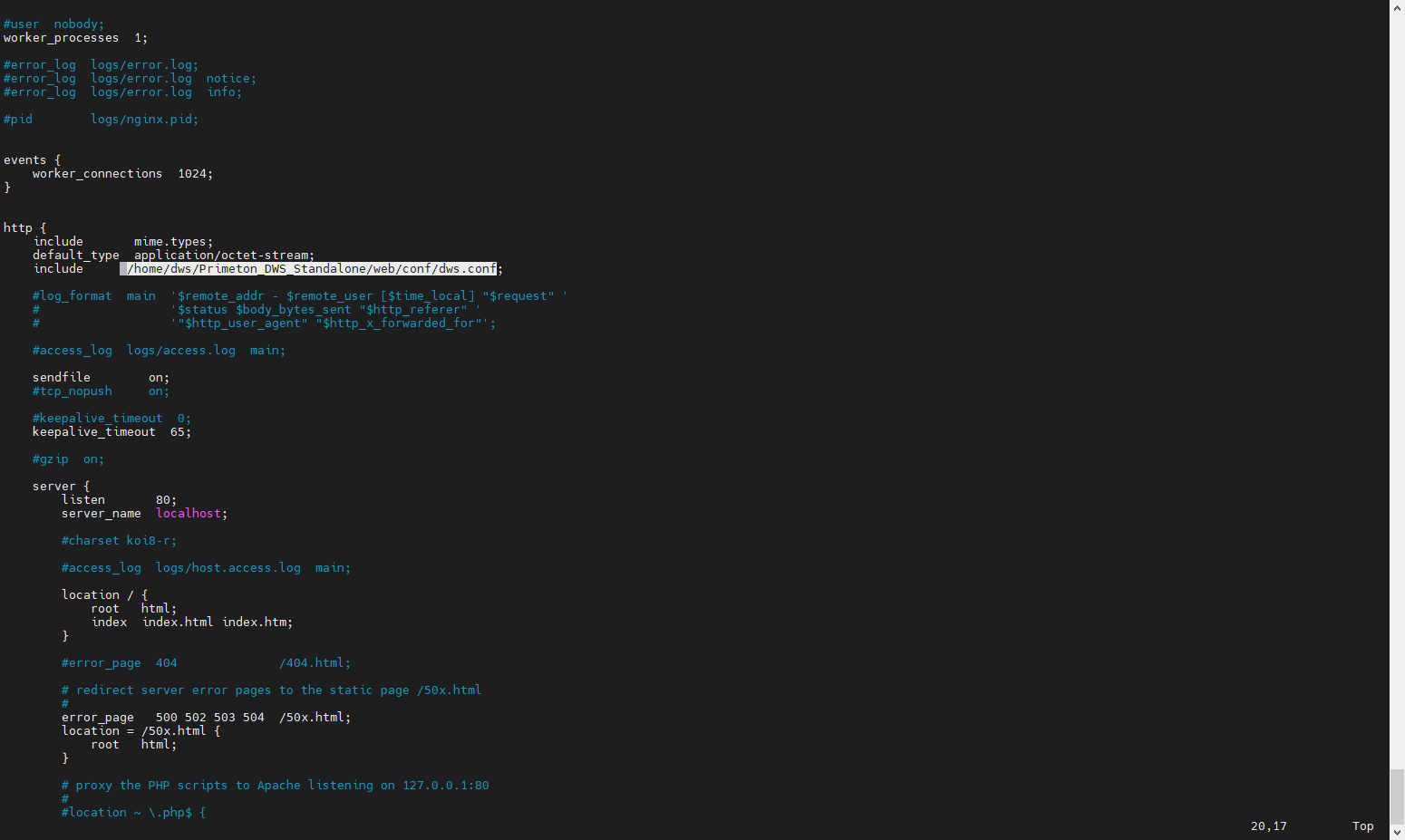
}修改 nginx.conf 文件,引用 dws.conf 配置文件
vim nginx.confhttp {
# 其他全局配置...
include /home/dws/Primeton_DWS_Standalone/web/conf/dws.conf; # 使用绝对路径引入dws.conf
}
配置完成后重新启动 nginx 服务
cd nginx安装目录
./sbin/nginx      # 启动服务
./nginx -s reload # 重新加载
./nginx -s stop # 停止服务具体配置参见 血缘地图 中的配置说明。
service/dolphin/standalone-server/conf/application.yaml 文件中包含了master 和 worker的相关配置参数。
application.yaml 配置项说明:
| 配置项 | 默认值 | 描述 |
|---|---|---|
| max-system-cpu-usage-percentage-thresholds | 0.8 | worker 最大系统 cpu 使用值,只有当前系统 cpu 使用值低于最大系统 cpu 使用值,worker 服务才能接收任务。 默认值为0.8: 会使用 80% 的操作系统 CPU。 |
| max-jvm-cpu-usage-percentage-thresholds | 0.8 | worker 最大 JVM cpu 使用值,只有当前 JVM cpu 使用值低于最大 JVM cpu 使用值,worker 服务才能接收任务。 默认值为0.8: 会使用 80% 的 JVM CPU。 |
| max-system-memory-usage-percentage-thresholds | 0.8 | worker 最大系统内存使用值,只有当前系统内存使用值低于最大系统内存使用值,worker 服务才能接收任务。 默认值为0.8: 会使用 80% 的操作系统内存。 |
| max-disk-usage-percentage-thresholds | 0.8 | worker 最大系统磁盘使用值,只有当前系统磁盘使用值低于最大系统磁盘使用值,worker 服务才能接收任务。 默认值为0.8: 会使用 80% 的操作系统磁盘空间。 |
一键启动/停止会将所有服务启动/停止。
 #切换 dws 用户
 su dws
 cd /home/dws/Primeton_DWS_Standalone
 #启动服务
 ./start-standalone.sh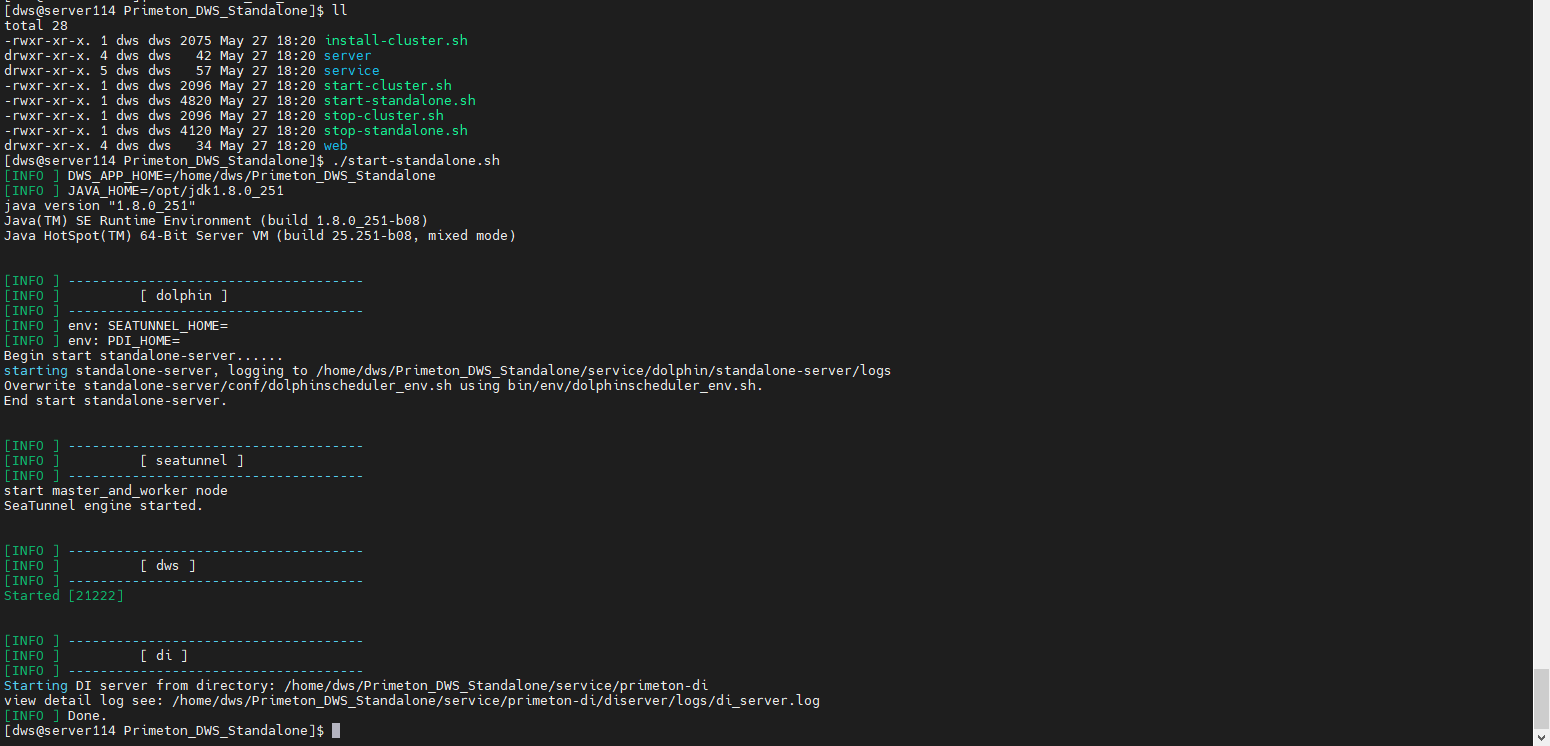
 #切换 dws 用户
 su dws
 cd /home/dws/Primeton_DWS_Standalone

 #停止服务
 ./stop-standalone.sh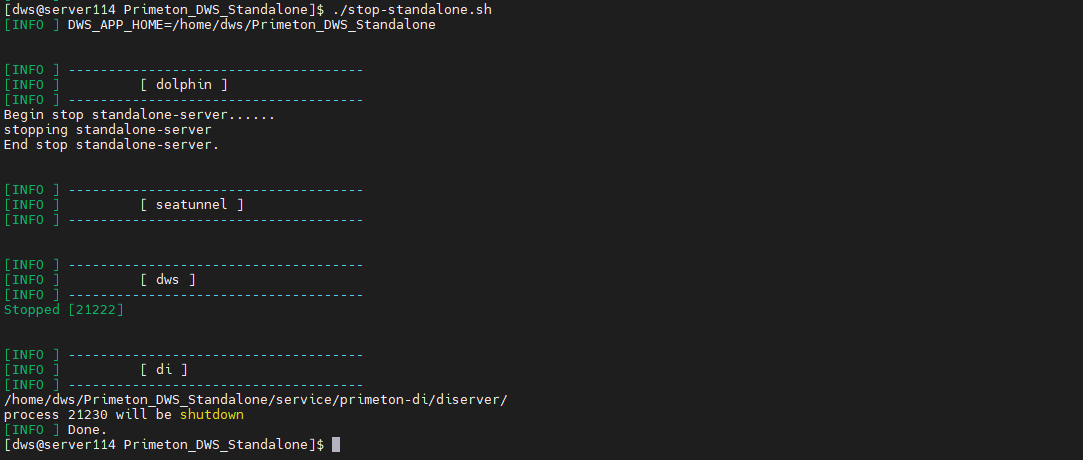
如果需要单独启动某个服务,参考如下命名:
 #启动服务
 ./start-standalone.sh dolphin
 #停止服务
./stop-standalone.sh dolphin #启动服务
./start-standalone.sh seatunnel
#停止服务
./stop-standalone.sh seatunnel #启动服务
./start-standalone.sh di
#停止服务
./stop-standalone.sh di #启动服务
./start-standalone.sh dws
#停止服务
./stop-standalone.sh dws当需要将dolphin、primeton-di、seatunnel 部署为集群时,可参考此步骤。此时 service 目录下的dolphin、primeton-di、seatunnel 可当做解压介质目录,集群安装时实际的安装路径在 install_env.sh 文件中配置。
修改service/seatunnel/install/install_env.sh脚本中的 ips 和 installPath 参数值为需要 集群部署的机器地址和安装路径。
vim service/seatunnel/install/install_env.ships=${ips:-"192.168.16.113,192.168.16.114"}
serverIps=${serverIps:-"192.168.16.113,192.168.16.114"}
serverPort=${serverPort:-"5801"}
sshPort=${sshPort:-"22"}
clientXms=${clientXms:-"256m"}
clientXmx=${clientXmx:-"512m"}
serverXms=${serverXms:-"2g"}
serverXmx=${serverXmx:-"4g"}
installPath=${installPath:-"/home/soft/seatunnel"}
deployUser=${deployUser:-"dws"}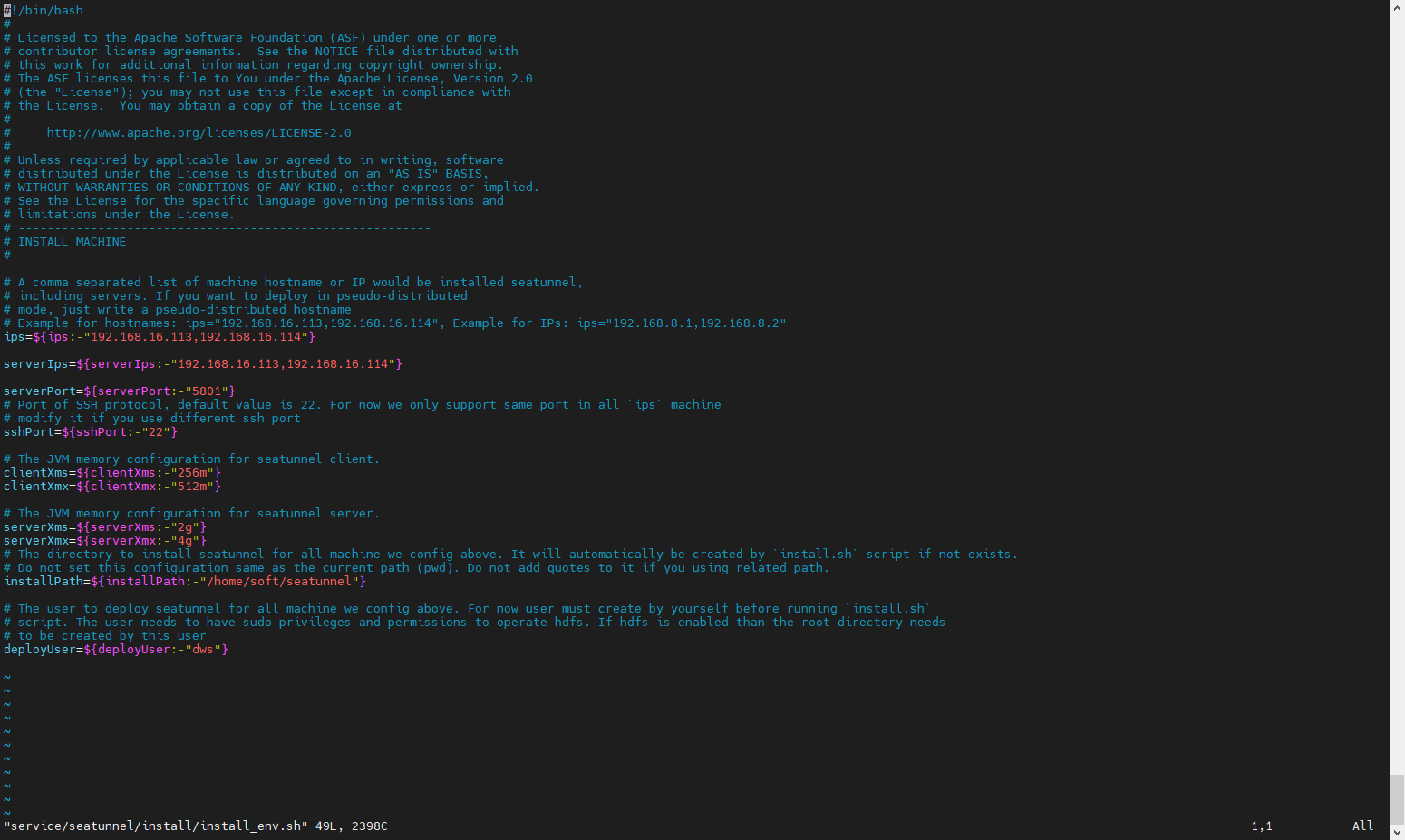
修改 service/primeton-di/install/install_env.sh 脚本中的ips 和 installPath 参数值为需要 集群部署的机器地址和安装路径。
vim service/primeton-di/install/install_env.ships=${ips:-"192.168.16.113,192.168.16.114"}
serverIps=${serverIps:-"192.168.16.113,192.168.16.114"}
serverPort=${serverPort:-"6000"}
sshPort=${sshPort:-"22"}
clientXms=${clientXms:-"256m"}
clientXmx=${clientXmx:-"512m"}
serverXms=${serverXms:-"2g"}
serverXmx=${serverXmx:-"4g"}
installPath=${installPath:-"/home/soft/primeton-di"}
deployUser=${deployUser:-"dws"}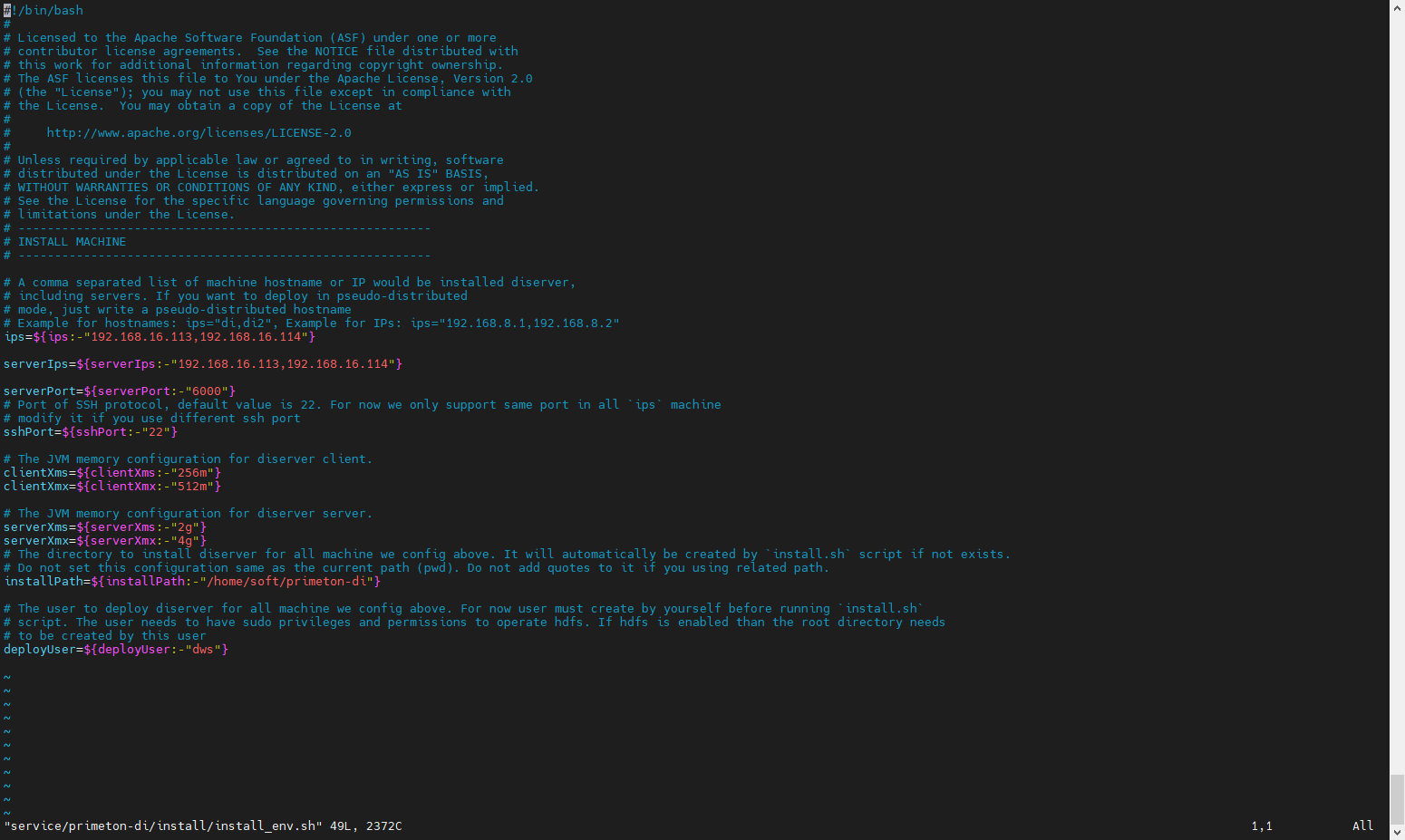
install_env.sh 描述了哪些机器将被安装 DolphinScheduler 以及每台机器对应安装哪些服务。
vim service/dolphin/bin/env/install_env.ships=${ips:-"192.168.16.113,192.168.16.114"}
sshPort=${sshPort:-"22"}
masters=${masters:-"192.168.16.113,192.168.16.114"}
workers=${workers:-"192.168.16.113:default,192.168.16.114:default"}
alertServer=${alertServer:-"192.168.16.114"}
#配置dolphinscheduler安装路径,在bin/install.sh运行后会安装dolphinscheduler到该目录下
installPath=${installPath:-"/home/soft/dolphin"}
#部署用户,即配置的免密用户
deployUser=${deployUser:-"dws"}
#与application.yaml中的namespace一致
zkRoot=${zkRoot:-"/dws"}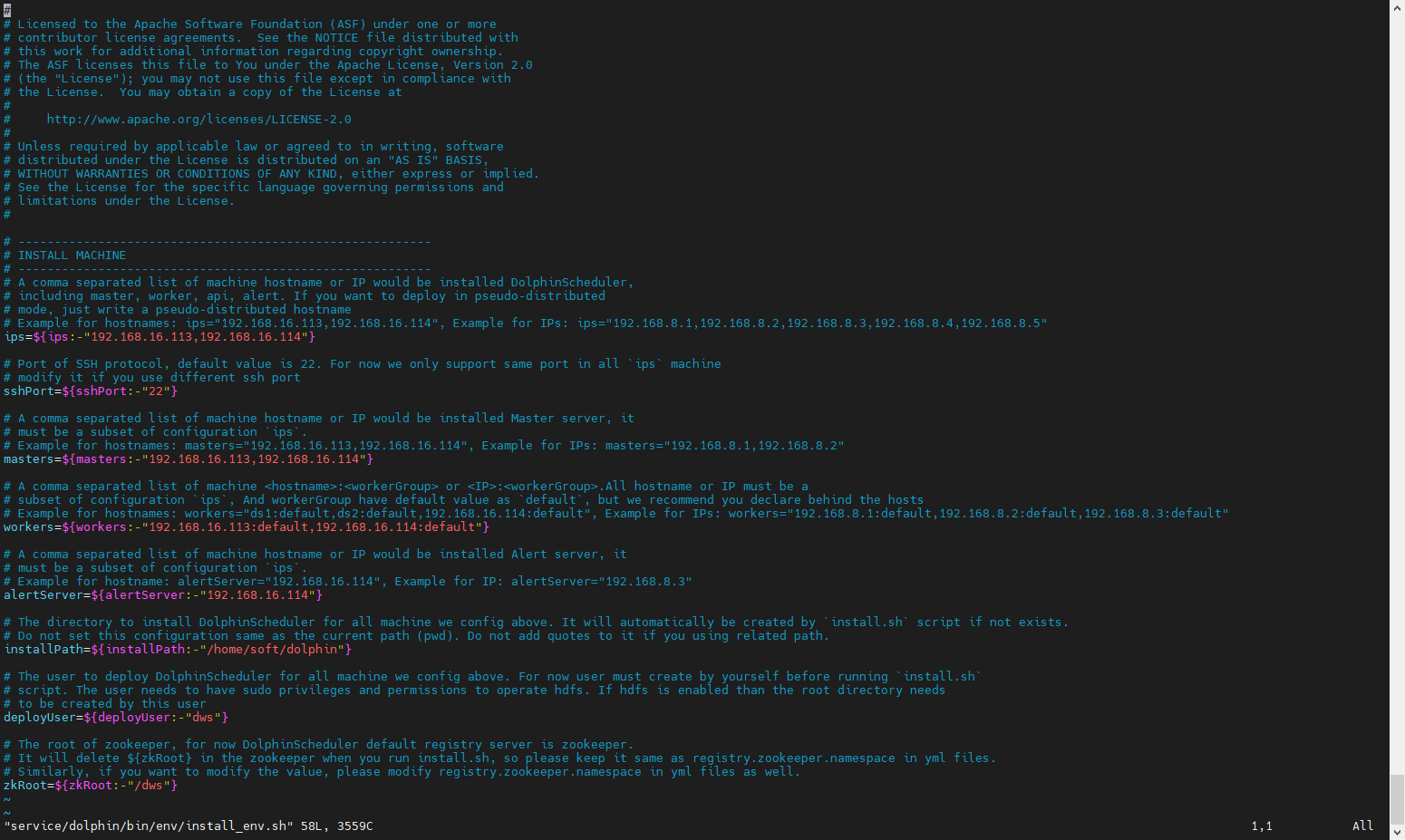
编辑 service/dolphin/bin/env/dolphinscheduler_env.sh 文件,修改 dolphinscheduler 数据源信息,并指定JAVA_HOME、PDI_HOME、SEATUNNEL_HOME环境信息,这里的 PDI_HOME 和 SEATUNNEL_HOME 环境变量值应是 7.1 和 7.2 步骤中设置的 installPath,在本示例中配置如下
vim service/dolphin/bin/env/dolphinscheduler_env.sh(略)
# JAVA_HOME, will use it to start DolphinScheduler server
export JAVA_HOME=${JAVA_HOME:-/opt/jdk1.8.0_251}
# Database related configuration, set database type, username and password
#DATABASE目前支持 mysql,DM,postgresql,gaussDB,oracle,SqlServer
export DATABASE=${DATABASE:-mysql}
export SPRING_PROFILES_ACTIVE=${DATABASE}
export SPRING_DATASOURCE_URL="jdbc:mysql://127.0.0.1:3306/dolphinscheduler?serverTimezone=Asia/Shanghai&useSSL=false"
export SPRING_DATASOURCE_USERNAME="root"
export SPRING_DATASOURCE_PASSWORD="primeton"
(略)
export SEATUNNEL_HOME=${SEATUNNEL_HOME:-/home/soft/seatunnel}
export CHUNJUN_HOME=${CHUNJUN_HOME:-/opt/soft/chunjun}
export PDI_HOME=${PDI_HOME:-/home/soft/primeton-di/diclient}
(略)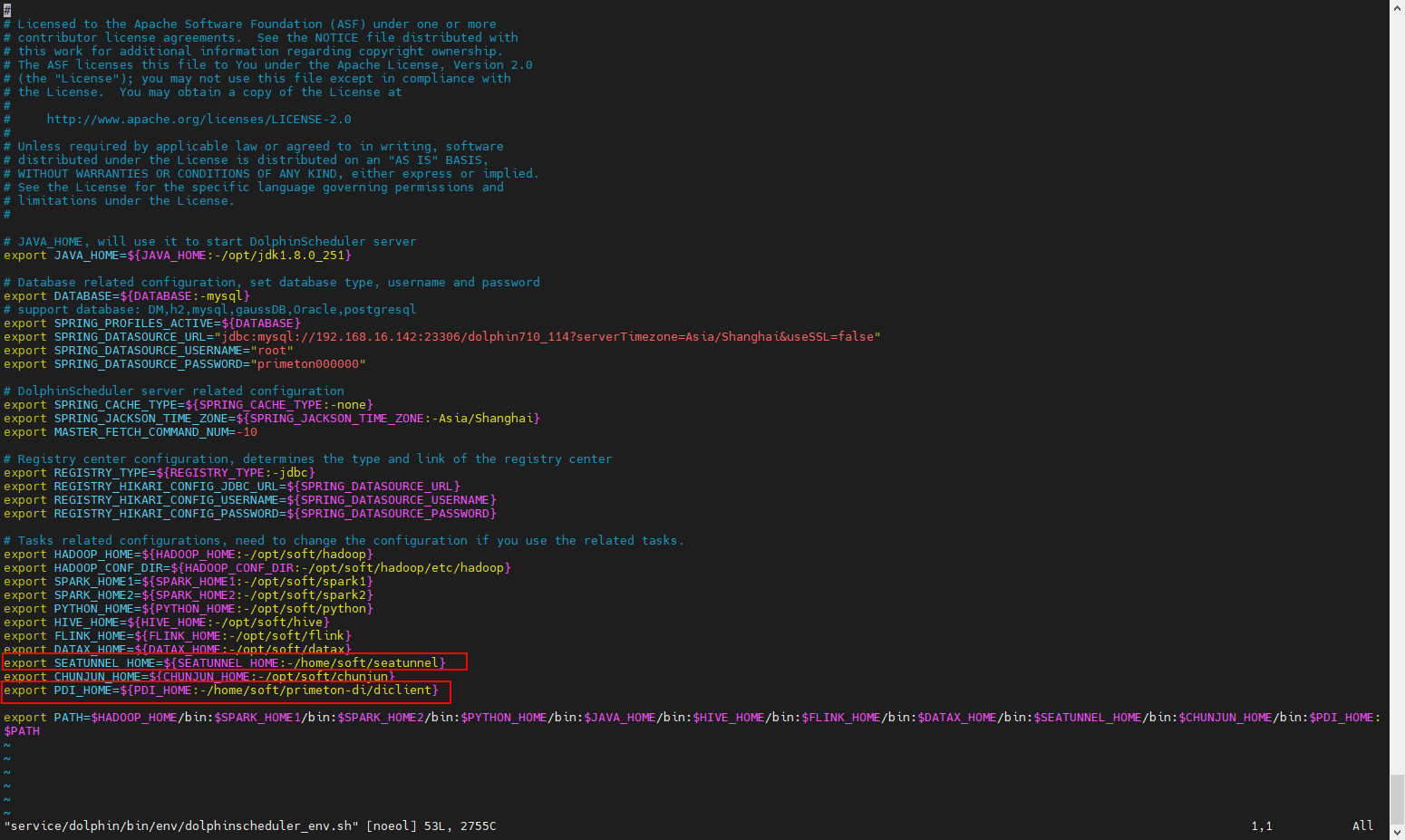
文件所在路径:service/dolphin/master-server/conf/application.yaml和service/dolphin/worker-server/conf/application.yaml
application.yaml 配置项说明:
| 配置项 | 默认值 | 描述 |
|---|---|---|
| max-system-cpu-usage-percentage-thresholds | 0.8 | worker 最大系统 cpu 使用值,只有当前系统 cpu 使用值低于最大系统 cpu 使用值,worker 服务才能接收任务。 默认值为0.8: 会使用 80% 的操作系统 CPU。 |
| max-jvm-cpu-usage-percentage-thresholds | 0.8 | worker 最大 JVM cpu 使用值,只有当前 JVM cpu 使用值低于最大 JVM cpu 使用值,worker 服务才能接收任务。 默认值为0.8: 会使用 80% 的 JVM CPU。 |
| max-system-memory-usage-percentage-thresholds | 0.8 | worker 最大系统内存使用值,只有当前系统内存使用值低于最大系统内存使用值,worker 服务才能接收任务。 默认值为0.8: 会使用 80% 的操作系统内存。 |
| max-disk-usage-percentage-thresholds | 0.8 | worker 最大系统磁盘使用值,只有当前系统磁盘使用值低于最大系统磁盘使用值,worker 服务才能接收任务。 默认值为0.8: 会使用 80% 的操作系统磁盘空间。 |
运行安装脚本 install-cluster.sh
su dws
cd /home/dws/Primeton_DWS_Standalone
./install-cluster.sh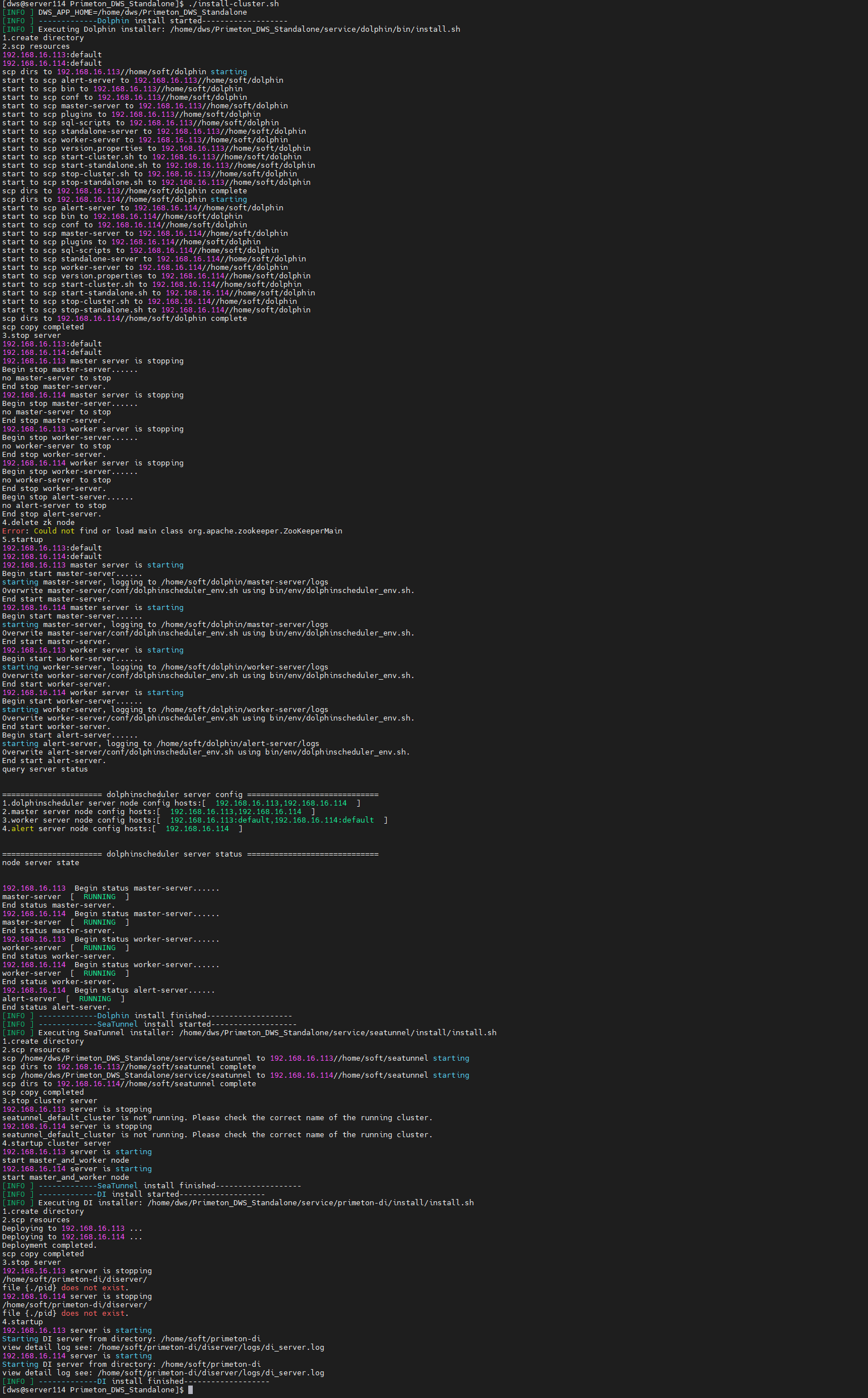
安装完成后,会自动启动dolphin、primeton-di、seatunnel 集群。
 #切换 dws 用户
 su dws
 cd /home/dws/Primeton_DWS_Standalone

#启动服务
./start-cluster.sh
#停止服务
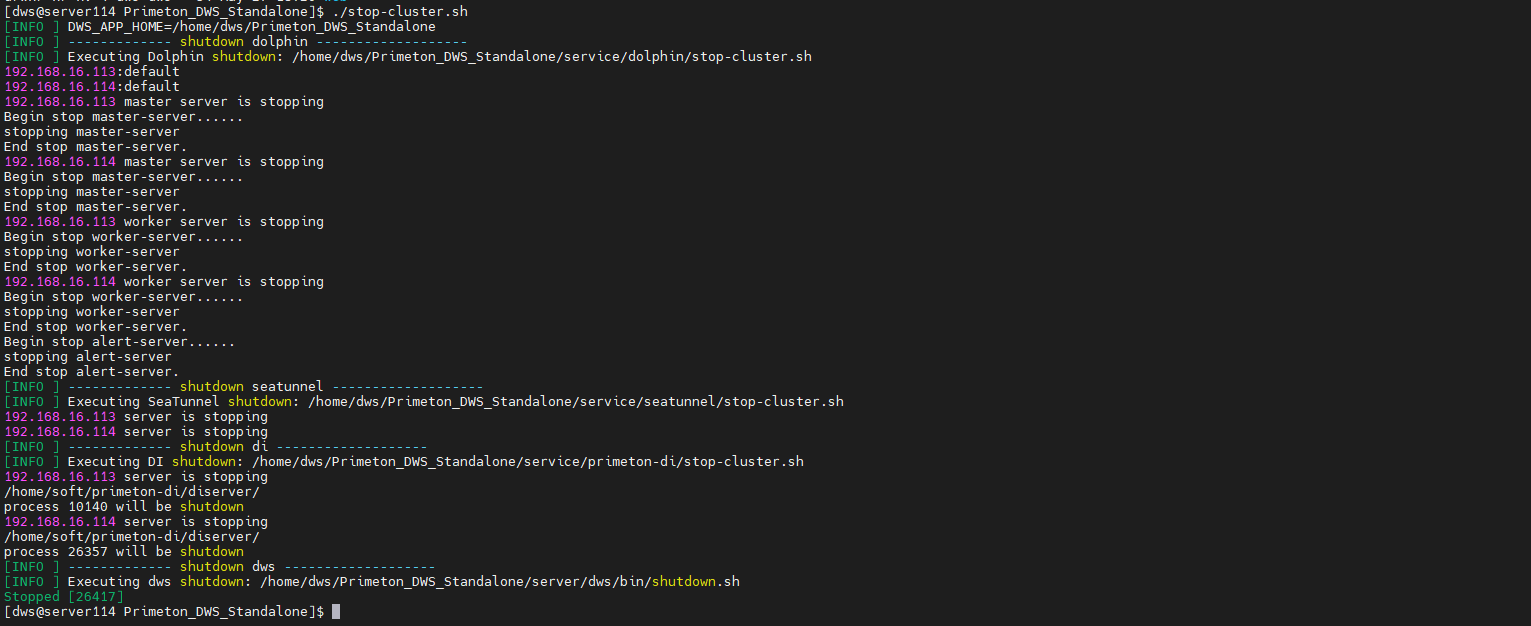
./stop-cluster.sh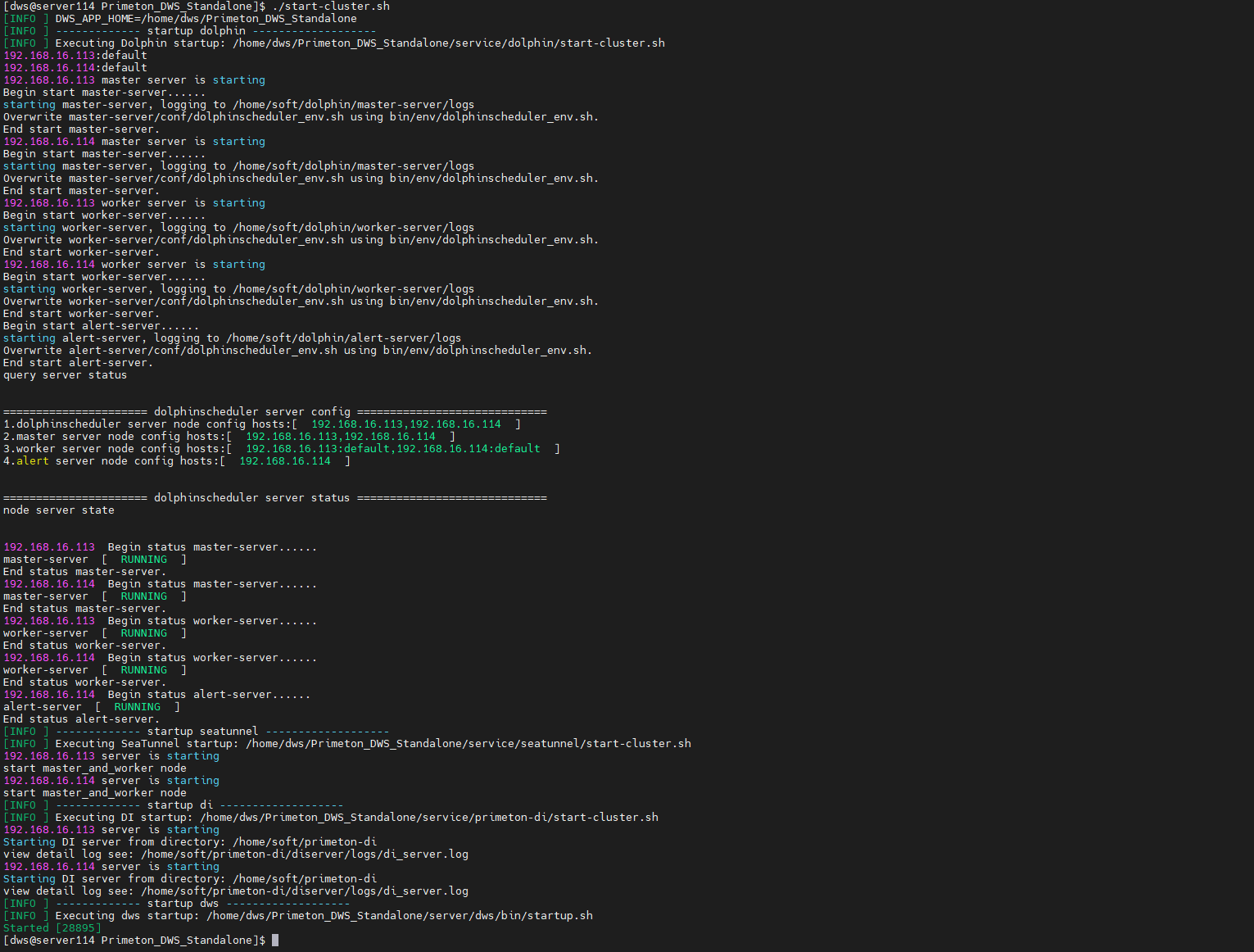
8.1 AI服务配置
参考AFC部署手册中智能体开发手册:
安装配置 AI服务:http://help.primeton.com/eos/d2b0e91a1d88837a/agent_reference/install_reference/AISERVICE_INSTALL.html
8.2 登录AFCENTER系统,点击【AI中心】,进入菜单 “模型管理”,点击新建模型
根据自有的大模型配置必要的参数并保存。默认的模型名称为"vllm-chat".如果配置大模型名称不是"vllm-chat",待下个步骤执行智能体导入后,需要进入工作流对所有大模型节点重新选择模型。
8.3 点击【AI中心】,进入菜单 “我的智能体”,右上角加号,选择导入,将介质中的 Primeton_Unidata_SQLBot.zip文件导入。导入成功后,点击智能体标签,进入新的浏览器页签后点击工作流,左下方点击发布。
8.4 切换回原浏览器页签,点击智能体的设置,弹窗点击 添加使用者,将用户添加到智能体中。
 http://localhost:80
默认账号/密码:admin/000000如果用户需要修改介质中默认的配置值,可以参考如下章节内容进行修改。
| dolphin master | dolphin worker | dolphin alert | dws | nginx |
|---|---|---|---|---|
| 5678 | 1234 | 50052 | 28085 | 80 |
MySQL:
<group name="default">
<configValue key="Database-Type">MySql</configValue>
<configValue key="Jdbc-Type"/>
<configValue key="C3p0-DriverClass">com.mysql.jdbc.Driver</configValue>
<configValue key="C3p0-Url">jdbc:mysql://127.0.0.1:3306/dws?characterEncoding=utf-8&serverTimezone=Asia/Shanghai</configValue>
<configValue key="C3p0-UserName">root</configValue>
<configValue key="C3p0-Password">primeton</configValue>
<configValue key="C3p0-PoolSize">10</configValue>
<configValue key="C3p0-MaxPoolSize">50</configValue>
<configValue key="C3p0-MinPoolSize">10</configValue>
<!-- //seconds, 0 means connections never expire -->
<configValue key="C3p0-MaxIdleTime">600</configValue>
<!-- //idle connections never tested -->
<configValue key="C3p0-IdleConnectionTestPeriod">900</configValue>
<configValue key="C3p0-MaxStatements">0</configValue>
<configValue key="C3p0-NumHelperThreads">1</configValue>
<configValue key="Transaction-Isolation">ISOLATION_DEFAULT</configValue>
<configValue key="Test-Connect-Sql">SELECT count(*) from EOS_UNIQUE_TABLE</configValue>
<configValue key="Retry-Connect-Count">-1</configValue>
</group>Oracle:
<group name="default">
            <configValue key="Database-Type">Oracle</configValue>
            <configValue key="Jdbc-Type"/>
            <configValue key="C3p0-DriverClass">oracle.jdbc.OracleDriver</configValue>
            <configValue key="C3p0-Url">jdbc:oracle:thin:@127.0.0.1:1521:orcl</configValue>
            <configValue key="C3p0-UserName">C##DWS_INIT</configValue>
            <configValue key="C3p0-Password">primeton</configValue>
            <configValue key="C3p0-PoolSize">10</configValue>
            <configValue key="C3p0-MaxPoolSize">50</configValue>
            <configValue key="C3p0-MinPoolSize">10</configValue>
            <!-- //seconds, 0 means connections never expire -->
            <configValue key="C3p0-MaxIdleTime">600</configValue>
            <!-- //idle connections never tested -->
            <configValue key="C3p0-IdleConnectionTestPeriod">900</configValue>
            <configValue key="C3p0-MaxStatements">0</configValue>
            <configValue key="C3p0-NumHelperThreads">1</configValue>
            <configValue key="Transaction-Isolation">ISOLATION_DEFAULT</configValue>
            <configValue key="Test-Connect-Sql">SELECT count(*) from EOS_UNIQUE_TABLE</configValue>
            <configValue key="Retry-Connect-Count">-1</configValue>
  </group>
PostgreSQL: url连接中必须增加参数 ?stringtype=unspecified
 <group name="default">
            <configValue key="Database-Type">postgresql</configValue>
            <configValue key="Jdbc-Type"/>
            <configValue key="C3p0-DriverClass">org.postgresql.Driver</configValue>
            <configValue key="C3p0-Url">jdbc:postgresql://127.0.0.1:5432/dws7la_test?stringtype=unspecified</configValue>
            <configValue key="C3p0-UserName">dws7la_test</configValue>
            <configValue key="C3p0-Password">primeton</configValue>
            <configValue key="C3p0-PoolSize">10</configValue>
            <configValue key="C3p0-MaxPoolSize">50</configValue>
            <configValue key="C3p0-MinPoolSize">10</configValue>
            <!-- //seconds, 0 means connections never expire -->
            <configValue key="C3p0-MaxIdleTime">600</configValue>
            <!-- //idle connections never tested -->
            <configValue key="C3p0-IdleConnectionTestPeriod">900</configValue>
            <configValue key="C3p0-MaxStatements">0</configValue>
            <configValue key="C3p0-NumHelperThreads">1</configValue>
            <configValue key="Transaction-Isolation">ISOLATION_DEFAULT</configValue>
            <configValue key="Test-Connect-Sql">SELECT count(*) from EOS_UNIQUE_TABLE</configValue>
            <configValue key="Retry-Connect-Count">-1</configValue>
  </group>
DM:
 <group name="default">
            <configValue key="Database-Type">DM</configValue>
            <configValue key="Jdbc-Type"/>
            <configValue key="C3p0-DriverClass">dm.jdbc.driver.DmDriver</configValue>
            <configValue key="C3p0-Url">jdbc:dm://127.0.0.1:5236/DWSV7LA</configValue>
            <configValue key="C3p0-UserName">DWSV7LA</configValue>
            <configValue key="C3p0-Password">primeton</configValue>
            <configValue key="C3p0-PoolSize">10</configValue>
            <configValue key="C3p0-MaxPoolSize">50</configValue>
            <configValue key="C3p0-MinPoolSize">10</configValue>
            <!-- //seconds, 0 means connections never expire -->
            <configValue key="C3p0-MaxIdleTime">600</configValue>
            <!-- //idle connections never tested -->
            <configValue key="C3p0-IdleConnectionTestPeriod">900</configValue>
            <configValue key="C3p0-MaxStatements">0</configValue>
            <configValue key="C3p0-NumHelperThreads">1</configValue>
            <configValue key="Transaction-Isolation">ISOLATION_DEFAULT</configValue>
            <configValue key="Test-Connect-Sql">SELECT count(*) from EOS_UNIQUE_TABLE</configValue>
            <configValue key="Retry-Connect-Count">-1</configValue>
  </group>
openGauss:
 <group name="default">
            <configValue key="Database-Type">gaussDB</configValue>
            <configValue key="Jdbc-Type"/>
            <configValue key="C3p0-DriverClass">org.opengauss.Driver</configValue>
            <configValue key="C3p0-Url">jdbc:opengauss://127.0.0.1:15432/dws7_test</configValue>
            <configValue key="C3p0-UserName">gaussdb</configValue>
            <configValue key="C3p0-Password">primeton</configValue>
            <configValue key="C3p0-PoolSize">10</configValue>
            <configValue key="C3p0-MaxPoolSize">50</configValue>
            <configValue key="C3p0-MinPoolSize">10</configValue>
            <!-- //seconds, 0 means connections never expire -->
            <configValue key="C3p0-MaxIdleTime">600</configValue>
            <!-- //idle connections never tested -->
            <configValue key="C3p0-IdleConnectionTestPeriod">900</configValue>
            <configValue key="C3p0-MaxStatements">0</configValue>
            <configValue key="C3p0-NumHelperThreads">1</configValue>
            <configValue key="Transaction-Isolation">ISOLATION_DEFAULT</configValue>
            <configValue key="Test-Connect-Sql">SELECT count(*) from EOS_UNIQUE_TABLE</configValue>
            <configValue key="Retry-Connect-Count">-1</configValue>
  </group>
Sqlserver:
<group name="default">
            <configValue key="Database-Type">SqlServer</configValue>
            <configValue key="Jdbc-Type"/>
            <configValue key="C3p0-DriverClass">com.microsoft.sqlserver.jdbc.SQLServerDriver</configValue>
            <configValue key="C3p0-Url">jdbc:sqlserver://127.0.0.1:1433;databaseName=dws7;trustServerCertificate=true</configValue>
            <configValue key="C3p0-UserName">dws7</configValue>
            <configValue key="C3p0-Password">primeton</configValue>
            <configValue key="C3p0-PoolSize">10</configValue>
            <configValue key="C3p0-MaxPoolSize">50</configValue>
            <configValue key="C3p0-MinPoolSize">10</configValue>
            <!-- //seconds, 0 means connections never expire -->
            <configValue key="C3p0-MaxIdleTime">600</configValue>
            <!-- //idle connections never tested -->
            <configValue key="C3p0-IdleConnectionTestPeriod">900</configValue>
            <configValue key="C3p0-MaxStatements">0</configValue>
            <configValue key="C3p0-NumHelperThreads">1</configValue>
            <configValue key="Transaction-Isolation">ISOLATION_DEFAULT</configValue>
            <configValue key="Test-Connect-Sql">SELECT count(*) from EOS_UNIQUE_TABLE</configValue>
            <configValue key="Retry-Connect-Count">-1</configValue>
</group>(略)
server.port=28085
(略)(略)
master:
listen-port: 5678
worker:
# worker listener port
listen-port: 1234
alert:
port: 50052
(略)如果用户需要使用大数据环境进行文件管理(DWS的数据开发->项目配置->文件管理),则需进行以下配置。
参考 DolphinScheduler 的对接分布式或远端对象存储